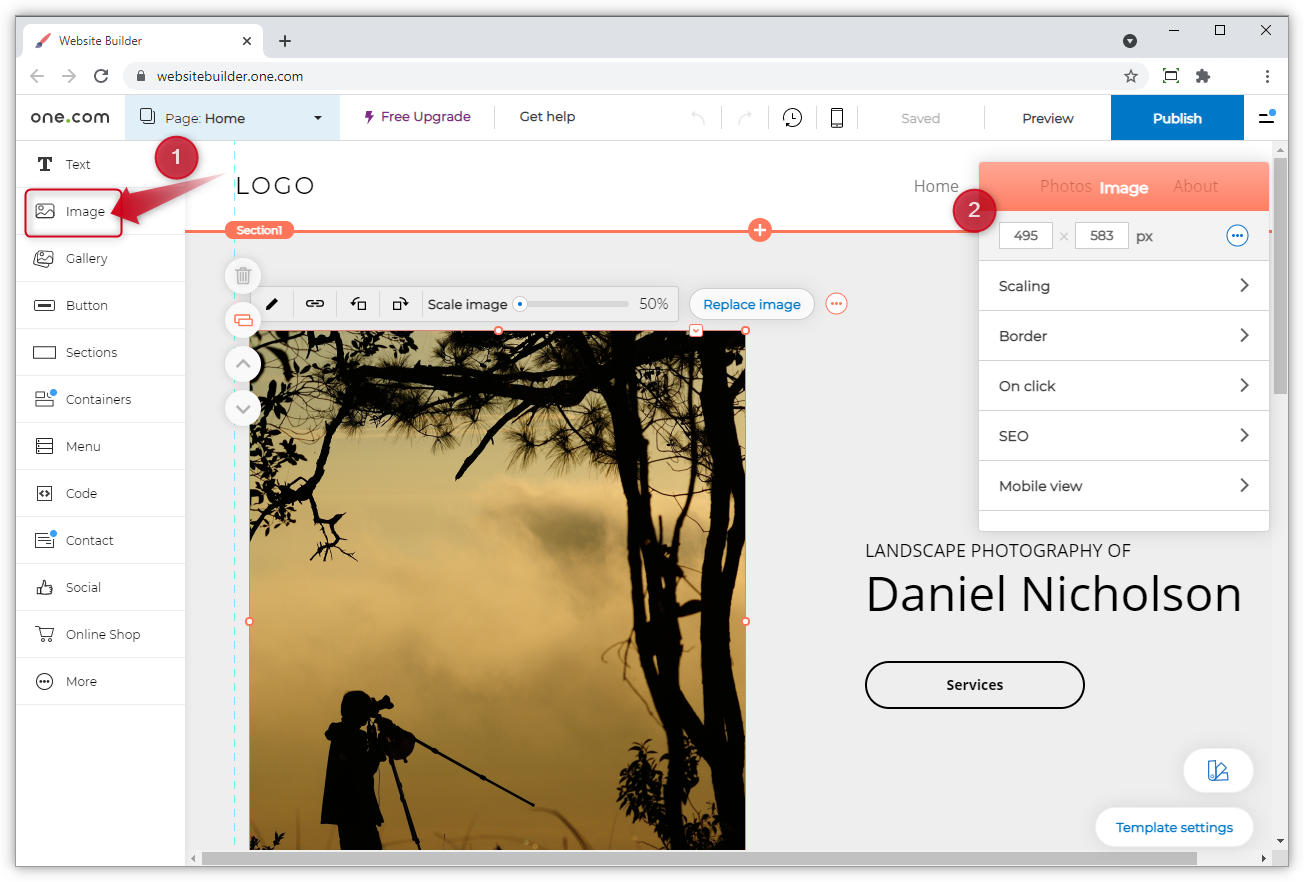
HOW TO CREAT AWEBSITE IN THREE(3) SIMPLE STEPS

Add-Image.png

How to Make a Website in 3 Easy Steps (for Beginners)

  1. Pick your website’s hosting provider and domain name
  2. Choose the right website building platform
  3. Design your website (and launch it)

How to Make A Website in 3 Easy Steps: Free Step-by-Step Tutorial for Beginners. 

These three easy steps are designed to take the complication out of how to make a website. Now, if these three steps seem like a foreign language to you… know that you’re not alone. That’s why I’m here.

I’m going to guide you through all three of these steps (in detail), so that when you’re done here—you’ll be launching your own WordPress powered website.

No more worrying about how difficult making a website can be, just follow along as we go. Now, let’s get started!


1. Pick your website’s hosting provider and domain name

The first step in learning how to make a website is picking your website’s hosting provider.forexample wordpress

A hosting provider is the company that “hosts” your website, powering everything behind-the-scenes and keeping it live, visible on the Internet.

The hosting provider I recommend using is wordpress. They’re very affordable and have been around in the web hosting world for nearly two decades, powering some of the world’s most popular websites. They’re my pick mainly because their customer service is top-notch and always available to help troubleshoot any technical issues while you’re still going through the process of learning how to make a website.

Selecting your hosting plan.

Next, you’ll select the hosting plan that’ll power your website and make it visible on the Internet. I recommend their Choice Plus plan (which I originally used to make my website). It comes with their Domain Privacy feature, which hides your personal information (name, email, phone number and address) from being published anywhere online as the official owner of your website. With this plan, Bluehost protects that information on your behalf.

Any of these hosting plans will be fine as you’re learning to make a website—and you can always come back to add the domain privacy in later either during the checkout process or further on down the line for around $1/mo extra to your plan.

Next, you’ll need to pick a domain name for your website.

A domain name is your website’s address on the Internet.

Mine here, is ryrob.com, a nickname I’ve had for many years.

Your domain name should be at least somewhat related to either your business, your name or the topics you plan on writing about. It can be something like yourwebsite.com or bobscargarage.org. There are practically limitless options when it comes to picking a domain name (that’s available).

Here, you’ll type in the domain name you want your website to have.

If your first domain name of choice isn’t available (which is a likely possibility), you can either try another option that comes to mind—or (what I recommend) select the option to choose your domain name later after getting the rest of your hosting plan squared away and taking a little more time to think the website name through.

I cover much more about how to choose the right name for your website in this guide if you’re not yet decided.

Here’s where you can choose your domain later (it’s a popup that will appear if you hover on this page for long enough or move your mouse up toward the top of the page):

After either choosing your domain name or opting to pick it later, you’ll be taken to the final step in the sign up process—creating your account.

Creating your hosting account.

Fill in all of your account details (note: it’s important to use a current email address because that’s where your login details will be sent).

Getting right hosting package.

Here you’ll choose the account plan based on the price you want to lock in, and how far in advance you want to pay.
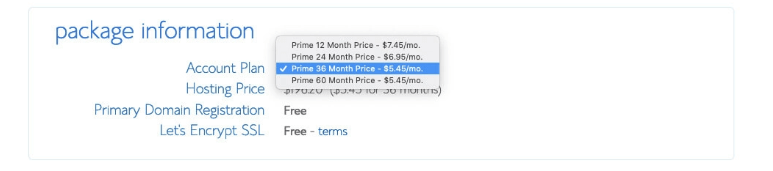
Make a Website Bluehost Package Choices

Note that Bluehost only offers options for you to pay 1, 2, 3 or 5 years upfront in one single payment. They don’t offer a monthly payment option (Dreamhost is a hosting company that does as are these other monthly hosting plans). But one advantage of using Bluehost, is that with whichever plan you choose, the price works out to be an overall better deal than just about any other hosting company can offer.

Which plan is the best?

I recommend the “Prime 36 Month Price” because it locks in the lowest possible price for hosting your website. That’s what I’ve used, and it guarantees your website hosting at their lowest rate (including the domain privacy) for the next 3 years. For that reason, I recommend going with the longest duration plan that your budget can spring for (to save on overall costs in the long run).

What about the extras? (Skip all but one)
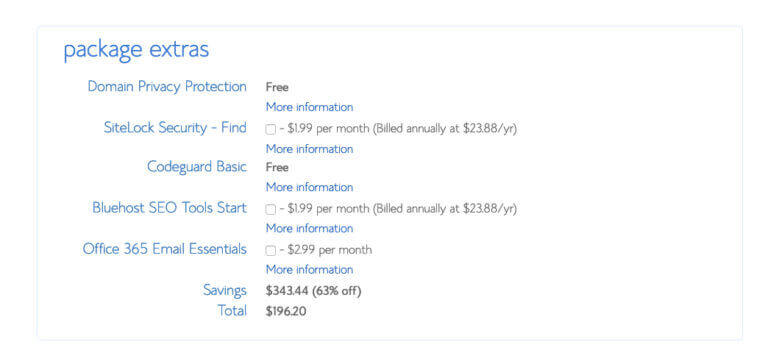
Package Extras Web Hosting Plan Options

I recommend keeping the Domain Privacy Protection extra on your plan, but you can skip the rest. There are plenty of free and cheap WordPress plugins & blogging tools you can use for SEO, additional security, backups and getting email set up on your website—making most of these package extras not necessary for the average website owner.

The total you see is the amount you’re going to pay for getting your website online today. That means though, that you won’t have to pay again for 1, 2 or 3 years depending on the hosting plan you chose. Plus, Bluehost offers a 30-day money back guarantee if things don’t go as planned with your website.

Input your billing information.
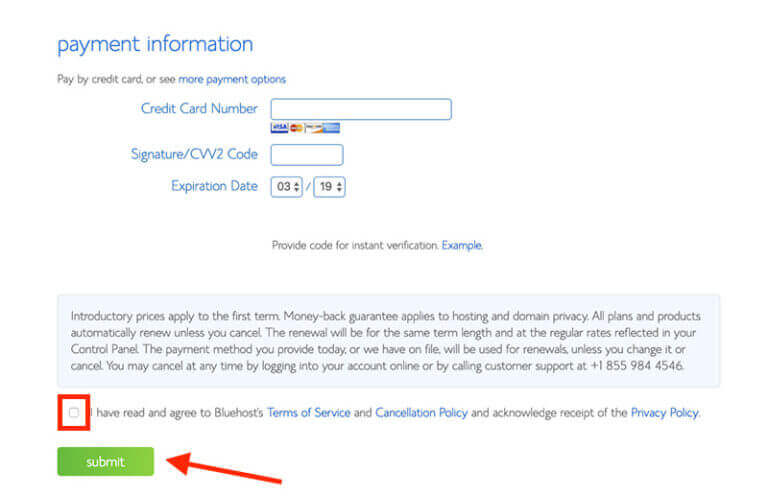
How to Make a Website Billing Information Web Hosting Screenshot

Finally, you’ll type in your billing information, check the box that you agree to their Terms of Service and then hit the green “Submit” button.

And… boom! 🎉

You just checked off the first (and biggest) step in how to make a website.

Now, on the very next page after completing your checkout with Bluehost, you’ll be guided step-by-step through the process of installing WordPress as the free website building platform on your website. This is where you’ll control the visual look of your website and where you’ll publish new pages or blog posts from.

An alternative website hosting provider to consider

Dreamhost: Remember, Bluehost doesn’t offer a true monthly billed hosting plan that allows you to pay month-to-month. Dreamhost does. Over the last decade, I’ve hosted over a dozen of my own websites on Dreamhost (and still do). They have most of the same features as Bluehost, like a 1-click WordPress installation, free SSL certificate and website


2. Choose the right website building platform

Of all the website building platforms on the market today, it’s estimated that WordPress powers upwards of 60% of the websites on the Internet.

Why? Because its hands down the easiest website builder to learn and also offers the widest range of customization abilities—not to mention it’s completely free to use.

That’s why I use it. That’s why millions of small business owners, bloggers and publishers use it to make their websites too.

What is WordPress? WordPress is a website building platform (started in 2003) to help publishers, businesses and bloggers quickly build, publish and maintain websites without having to hire a technical team to do it.


Now, to be fair, there are many other different website builders out there that you can consider—Wix, Squarespace, Weebly to name just a few.

A quick Google search will literally overwhelm you with options.

However, each and every one of these platforms will also require some sort of additional payment in order to use their building tools—ranging from $6 to upwards of $100/mo depending upon the features you need. Most will also require that you sign up for a hosting plan with them too (which will be more expensive than with Bluehost).

You don’t need to pay extra in order to have a good website building platform.

WordPress is free to use, and truly better than any other platform out there today. That’s what we’ll be using to make your website here today.

This version of WordPress is what’s called a self-hosted WordPress website—which is when you go out to secure your own hosting plan (through Bluehost) and then install free WordPress as the Content Management System (CMS) to power the design of your website.

Along with being free to use, WordPress also boasts well into the thousands of people who’ve built (both free and paid) themes and plugins you can use to very easily customize the look, feel and functionality of your website without the need to code at all.

What is a WordPress theme? A WordPress theme is a series of page templates and stylesheets that are used to dictate the appearance of a WordPress-powered website.

What is a WordPress plugin? A WordPress Plugin is a piece of software you can upload, that contains functions you can add to your WordPress website. They typically add more functionality or enable brand new features on your WordPress-powered website.

You can follow the short tutorial video above, to get WordPress installed on your website in a matter of minutes.

We’ll pick right back up here with the third and final step of our tutorial about how to make a website… designing and launching.

Keeping in mind that

3. Design your website (and launch it)
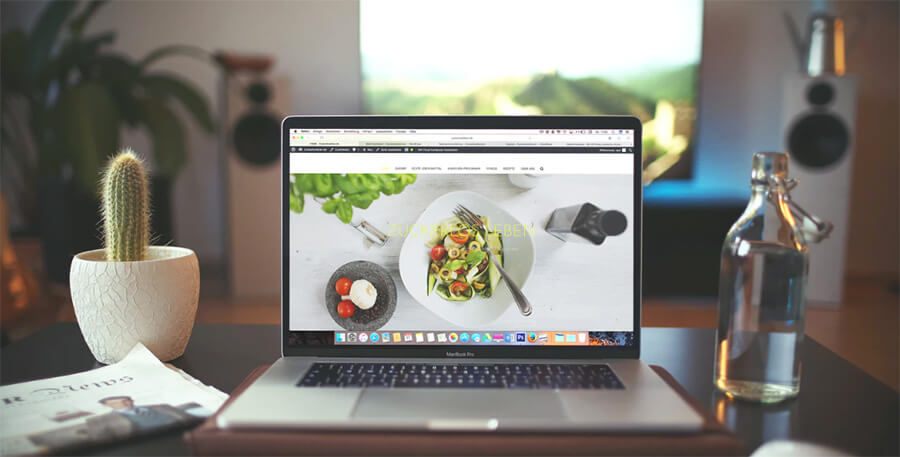
How to Make a Website Homepage Design Example and Screenshot

If your eventual plan is to make money from your website, you’ll want to build an aesthetically appealing site that’s easy to navigate.

All copyrights reserved to 256jaquardug

HOW TO CREAT MTN MOMO VIRTUAL CARD FOR ONLINE PAYMENT

MTN master card (MOMO Card)

Step one

One your mobile phone simply dial *165*70# and the following preview will be shown.

MTN master card (MOMO Card)

Step two

Select option 1 to create the MTN MoMo Card

MTN master card (MOMO Card)

Enter your mtn mobile money pin, for every MTN MoMo card created, it charges you a fee of 1000 ugx.

After those simple steps your MTN MoMo card is now created and ready for use anywhere, you will receive a message on your phone showing you card details.

NOTE

  • Each MTN MoMocard you create will cost you UGX 1,000.
  • An MTN MoMocard has a maximum value of UGX 3,000,000 and is valid for 30 days.
  • You cannot withdraw cash using the MTN MoMocard. It can only be used to make online payments.

 By 256jaquardug

All copyrights are reserved to 256jaquardug

HOW TO CREAT AIRTEL VIRTUAL MASTER CARD FOR FREE USED FOR ONLINE PAYMENT

Airtel Super Saver
How to create an Airtel Money Mastercard using USSD

>>Dial *185*7# on Airtel
>>Select option #9 (AirtelMoney Mastercard)
>>Select option #1 (Get a Card)
>>Enter AirtelMoney PIN to continue.
>>You will receive an SMS with the Mastercard information.

How to get Airtel Money Mastercard using My Airtel App

>>Open the My Airtel App.
>>Tap/ swipe to Airtel Money and enter your PIN to access the service.
>>Tap on ‘Mastercard Get Card’ option with the Mastercard logo in the wallet tile
>>Re-enter your Airtel Money PIN to initiate the creation of a virtual Mastercard in your name.
>>You will get an SMS with a link to your Mastercard information.

Top 10 Richest Social Media Billionaires 2021

Social Media Billionaires

AS MARK ZUCKERBURG OF META INC IS TOP RICHEST POWERING ZHANG YIMING THE SECOND PLACE OF TIKTOK BY 2.8 TIMES

 December, 10, 2021

Social media is a important part most of everyone today’s life. Have a look at Richest Social Media Billionaires of 2021.

List of Top 10 Richest Social Media Billionaires 2021

Social Media is a internet technology which helps people to connect, shares their thoughts, ideas, information and talent through social media platforms. More than 58% of the world population use social media approx. 4 billion people. There are different types of social media platforms where you share images, texting, video sharing, discussions sites, and many others. These social platforms are using by billions of people, and their valuation is also huge, what about their founders, key people.

Here is The List of Top 10 Richest Social Media Billionaires 2021 –

1. Mark Zuckerberg

Mark Zuckerberg (37) is an American internet entrepreneur, tech business magnate co-founder and CEO of Facebook (American social media and social networking site) consider one of the big 5 companies. Mark’s net worth is nearly $118 billion as of May 2021, he is one of the top richest people on earth.

2. Zhang Yiming

Zhang Yiming (38) is a Chinese internet entrepreneur billionaire founder and Chairman of ByteDance (Chinese multinational internet technology), and TikTok (video-sharing social networking service aka Douyin in China, owned by ByteDance). Yiming’s net worth is nearly $44.5 billion as of May 2021, he is named one of Time Magazine’s 100 most influential people of 2019.

3. Dustin Moskovitz

Dustin Moskovitz (37) is an American tech entrepreneur co-founder of Facebook with Mark and others. He left Facebook in 2008 and co-found Asana (Software service), and Good Ventures (Philanthropic org.) in 2011. As of May 2021, Dustin’s net worth is $19.2 billion.

4. Pavel Durov

Pavel Durov (36) is a Russian internet entrepreneur founder of VK (aka Vkontakte Russian online social networking service) in 2006 and later in 2013 co-founded Telegram (a cross-platform software, cloud-based instant messaging) with his elder brother Nikolai Durov. Pavel’s net worth is $17.2 billion as of May 2021.

5. Jack Dorsey

Jack Dorsey (44) is an American tech entrepreneur co-founder and CEO of Twitter (microblogging and social networking site), CEO and Co-founder of Square (an American digital payment company). Dorsey’s net worth is $15 billion as of 2021.

6. Eduardo Saverin

Eduardo Saverin (39) is a Brazilian angel investor and internet entrepreneur, one of the co-founders of Facebook (social media site) with Zuckerberg and others. As of 2021 Saverin’s net worth is $14.7 billion.

7. Evan Spiegel

Evan Spiegel (30) is an American tech entrepreneur co-founder and CEO of Snapchat and Snap Inc. (American social media company) along with Bobby Murphy and Reggie Brown. He was listed youngest billionaire in the world in 2015 by Forbes. Spiegel net worth is $11.9 billion as of year 2021.

8. Bobby Murphy

Bobby Murphy (32) is an American software engineer and internet entrepreneur co-funder and CTO of Snap Inc. and Snapchat (multimedia messaging app), In 2015, he was listed the second youngest billionaire by Forbes. As of 2021 Murphy’s net worth is $10.2 billion.

9. Jan Koum

Jan Koum (45) is a Ukrainian-born American computer programmer and tech billionaire co-founder of WhatsApp (cross-platform messaging, voice, and video app owned by Facebook in 2014). Jan’s net worth is nearly $10 billion as of 2021.

10. Ben Silbermann

Ben Silbermann (38) is an American tech entrepreneur, billionaire, co-founder and CEO of Pinterest (image sharing and social networking site). Prior to Pinterest he worked at Google. Silbermann’s net worth is nearly $3.5 billion as of May 2021.

HOW ACOMPUTER MODEM TRANSMITES ELECTRICSL SIGNALS TO NETWORK

 from your ISP as well.

Modems

Photo: 256jaquardug

A modem modulates and demodulates electrical signals sent through phone lines, coaxial cables, or other types of wiring; in other words, it transforms digital information from your computer into analog signals that can transmit over wires, and it can translate incoming analog signals back into digital data that your computer can understand. Most stand-alone modems have just two ports: one that connects to the outside world, and an Ethernet jack that connects to a computer or a router.

If you use cable Internet service, your ISP probably gave you a modem when the company set up your service. But it didn’t do this out of the goodness of its heart—if you look at your bill, you’ll most likely discover that you’re paying an extra cost for connections.

Motorola MB7621

Motorola MB7621

The best modem for most people

Compatible with the most ISPs, the MB7621 supports internet plans up to 600 Mbps. It’s widely supported, it has a two-year warranty, and it pays for itself in about eight months.$78* from Amazon$80 from Best Buy

*At the time of publishing, the price was $103.

That’s one reason why we recommend that cable Internet users buy their own modems.1 Good ones such as the Motorola MB7621 or the Netgear CM500 cost between $60 and $80; the modem will pay for itself after a few months and last for years, even if you change cable providers.

If you use DSL or fiber Internet (like Verizon’s Fios service), your choices are more limited. Your ISP probably provides you a modem or a modem/router combo, and may not allow you to bring your own modem even if you can find one to buy in the first place. In many cases you can turn off the router features of a combination modem/router and use it as a stand-alone modem so you can add your own router, but the process for doing so (and whether that’s supported at all) differs depending on your service provider and the type of Internet connection you have.

HOW TO GET MTN FREE 1.5GB NO VPN NEEDED

With the use of mtn apps like mtn momo

You can download it from playstore and login then you will be able to get 500 mbs

When ever you recommend it you will get 200mbs when ever he or she you recommend he downloads it

By using mtn pulse when ever you download and register you will get 500mbs but when you recommend it to other person and download it you will be getting 200mbs for every reccomedation

By using mtn app

When ever you sign in ,in mtn app you will be getting 500mbs and you will be getting 200mbs for every reccomedations

NB:This offer is for only new registered users of these mtn apps .

DROIDVPN SEETINGS FOR ALL NETWORKS IN UGANDA

ALL DROIDVPN SETTINGS FOR ALL NETWORKS IN UGANDA  This loose limitless Internet trick is for 256jaquardug readers in Uganda on the MTN and Airtel networks. This trick can be configured on exceptional tunneling apps to present customers loose internet get right of entry to. This free net trick would not require customers to enroll in Internet package […]

DROIDVPN SEETINGS FOR ALL NETWORKS IN UGANDA

DROIDVPN SEETINGS FOR ALL NETWORKS IN UGANDA

ALL DROIDVPN SETTINGS FOR ALL NETWORKS IN UGANDA 

This loose limitless Internet trick is for 256jaquardug readers in Uganda on the MTN and Airtel networks. This trick can be configured on exceptional tunneling apps to present customers loose internet get right of entry to.

This free net trick would not require customers to enroll in Internet package deal of the sort of, purchase information or maybe use their facts to jump start the trick. The main requirement here is for the user to get the proper tunneling app and additionally the settings which we’ve got made available at no cost in this put up.

Since this trick uses the UDP protocol to tunnel at no cost internet get right of entry to, 256jaquardug
Pro customers can use any VPN app that supports UDP tunneling. Also users can select among Droid VPN, Troid VPN or any Android VPN app that may get the job achieved.

Mind you, we’ve got supplied the links to down load those apps on this. So you might not ought to visit the net trying to find the apps to down load. Also, we advocate that MTN and Airtel Ugandan users use a SIM card that does not have facts or airtime on it to verify that the trick honestly works.We made the settings open for our Android readers to get right of entry to and as nicely those on other OS systems to port to the tunneling apps of their preference. Follow the settings as shown underneath, configure and revel in the unfastened net trick.

Requirements:
1. A MTN,Airtel and Africell Ugandan SIM card with zero data and call credit
2. An Android device, iOS or PC.
3. Your Droid VPN
4. The configuration settings
Procedures:
1. Download download Droid VPN
2. Install the app and then open it.
3. Click on Settings and then go to UDP Settings
4. Now configure this way: 

Open Droid and do the below tweaks

Under UDP SETTINGS
Remote UDP port:        53
Local UDP port:.           80
Choose UDP mode:.    mode1
T count:.                         5000
R count:.                         4

Under TCP settings
Local TCP port:.            440
Remote TCP port:.        0

Under ICMP settings
ICMP mode:.               static seq

UNDER VPN CONNECTION SETTING
tunnel MTU size:.        1024

Input your account details and connect.

Droid VPN trick airtel and MTN
How to set it go to settings
1. *Go to UDP settings*
Remote udp -53
Local udp -80
UDP mode -mode 1
T count -0
R count -3
2. *Go to ICMP settings*
Static  seq number
3. *Go to VPN connection setting*
Tunnel mtu size -1024
*Connect to random server and enjoy free internet*🤳🤟🏼

STABLE DROID SETTINGS
Open Droid and do the below tweaks

Under UDP SETTINGS
Remote UDP port:👉🏼👉🏼80
Local UDP port:👉🏼👉🏼80
Choose UDP mode:👉🏼👉🏼mode1
T count:👉🏼👉🏼1
R count:👉🏼👉🏼11 or 14

Under ICMP settings
ICMP mode:👉🏼👉🏼 Queued Seq Number

UNDER VPN CONNECTION SETTING
tunnel MTU size:.        1024

Input your account details and connect.  This post is for EDUCATIONAL cause only! You are answerable for your action and usage of it. 256jaquardug handiest drops such to alert ISPs of their vulnerabilities.

Design a site like this with WordPress.com
Get started